
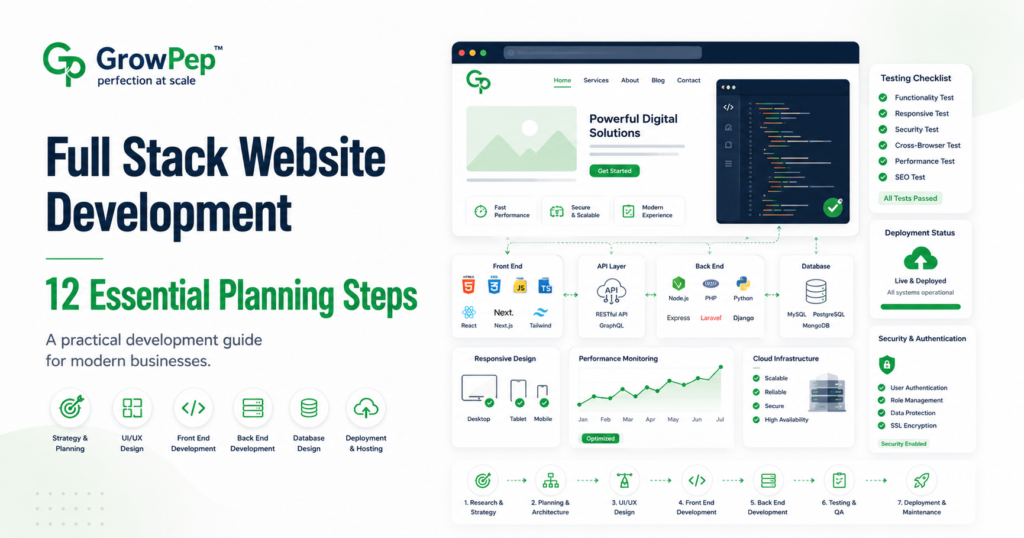
Full stack website development for businesses involves planning, designing, building, testing, deploying, and maintaining both the customer-facing interface and the technical systems operating behind a website or web application.
A professional business website may require more than attractive pages. It may need secure user accounts, databases, payment processing, dashboards, third-party integrations, content management, analytics, automated workflows, and reliable hosting infrastructure.
Without proper planning, a full stack project can become difficult to manage, expensive to revise, and dependent on unnecessary software. A structured development process helps clarify business requirements, technical responsibilities, project risks, and future maintenance needs before development begins.
This guide explains 12 essential planning steps for businesses preparing for a professional full stack website development project.
What Is Full Stack Website Development?
Full stack website development covers the main technical layers required to operate a modern website or web application.
These layers commonly include:
- Front-end development: The interface visitors see and interact with.
- Back-end development: Server-side logic, authentication, workflows, and application functions.
- Database management: Systems used to store, organize, retrieve, and update information.
- API integrations: Connections between the website and external software or services.
- Infrastructure: Hosting, deployment, domains, security, backups, and monitoring.
A small informational website may not require a complex full stack system. However, businesses needing custom accounts, portals, ecommerce functions, bookings, subscriptions, automated operations, or application-style features may benefit from a full stack approach.
Full Stack Website Development for Businesses: 12 Essential Planning Steps
1. Define the Business Objective
Begin by identifying why the website or application is being built. Technical decisions should support a clear business requirement rather than adding functionality simply because it is available.
Possible objectives include:
- Generating qualified inquiries
- Selling products or services online
- Allowing customers to book appointments
- Providing a client portal
- Managing subscriptions
- Automating an internal process
- Delivering digital products
- Connecting multiple business systems
- Replacing an outdated platform
Choose one primary objective and identify the supporting goals. This helps the development team prioritize features and avoid unnecessary complexity.
2. Identify the Target Users
The website should be planned around the people who will use it. Different user groups may require different permissions, information, workflows, and interfaces.
Potential users may include:
- Public website visitors
- Customers
- Business clients
- Employees
- Administrators
- Vendors or partners
- Content managers
- Support representatives
For each user type, document:
- What they need to accomplish
- What information they can access
- What actions they can perform
- Whether an account is required
- Which devices they are likely to use
- What support they may need
This process helps prevent permission problems and confusing user journeys later in development.
3. Document the Required Features
Create a practical feature list before requesting final pricing. Separate essential functionality from optional enhancements.
Possible features include:
- User registration and login
- Customer or client dashboards
- Product catalog and checkout
- Online payments
- Subscription management
- Appointment booking
- Search and filtering
- File uploads and downloads
- Email notifications
- Support tickets
- Admin reporting
- API integrations
- Multiple languages
- Role-based access
For every major feature, explain what triggers it, who uses it, what information is required, and what should happen after the action is completed.
4. Plan the Website Architecture
Website architecture defines how pages, features, content, and user journeys are organized.
A clear architecture may include:
- Public marketing pages
- Service or product pages
- Authentication pages
- Customer dashboard pages
- Account and billing pages
- Administrative interfaces
- Support and documentation areas
- Legal and policy pages
Important pages should be easy to locate and related content should be connected logically. Avoid creating deep navigation structures or multiple pages that serve the same purpose.
Planning architecture before visual design reduces the risk of missing important workflows.
5. Choose an Appropriate Technology Stack
The technology stack should reflect the project requirements, available budget, expected traffic, maintenance resources, and future development plans.
A full stack system may involve:
- HTML, CSS, and JavaScript
- A front-end framework or library
- A server-side programming language
- A back-end framework
- A relational or non-relational database
- A content management system
- Cloud hosting or a managed server
- Third-party APIs and software services
The newest technology is not automatically the best option. A suitable stack should be stable, maintainable, secure, and appropriate for the team responsible for supporting it.
Developers can consult resources such as MDN Web Docs when reviewing established web standards and browser technologies.
6. Design the Database Structure
Applications that store users, orders, subscriptions, bookings, messages, documents, or business records require a carefully planned database.
Database planning should consider:
- What information must be stored
- How records relate to one another
- Which fields are required
- Who can create, view, update, or delete data
- How duplicate records will be prevented
- How historical information will be retained
- How data will be backed up
- How sensitive information will be protected
Poor database planning can create slow queries, repeated information, reporting difficulties, and complicated future migrations.
7. Map Important User Workflows
A workflow describes the steps a person follows to complete a task.
Common workflows may include:
- Creating an account
- Submitting an inquiry
- Booking a service
- Purchasing a product
- Uploading a document
- Requesting support
- Updating a subscription
- Resetting a password
- Approving a request
For every important workflow, identify:
- The starting point
- The information required
- The validation rules
- The confirmation message
- The email or system notification
- The information stored in the database
- The possible error conditions
Clear workflow planning improves usability and reduces development misunderstandings.
8. Plan Third-Party Integrations
Many business websites connect with external platforms for payments, email marketing, customer relationship management, analytics, shipping, accounting, authentication, or scheduling.
Before approving an integration, confirm:
- Whether the platform provides an official API
- Which subscription plan is required
- Who owns the connected account
- What information will be exchanged
- Whether usage limits apply
- How failed connections will be handled
- Whether webhooks or scheduled synchronization are required
- What happens if the provider changes its API
Third-party platforms may introduce recurring fees, usage charges, technical limitations, or service interruptions outside the developer’s control.
9. Establish Security Requirements
Security should be considered during planning rather than added only after development is complete.
Important security considerations include:
- Secure password storage
- Role-based permissions
- Multi-factor authentication where appropriate
- Input validation
- Protection against common application vulnerabilities
- HTTPS configuration
- Secure API credentials
- Backup and restoration procedures
- Software update responsibilities
- Login and activity monitoring
Businesses should also determine which data is sensitive and whether specific legal, contractual, or industry requirements apply.
The OWASP Top 10 provides awareness of common web application security risks, but a complete security process may require broader testing and professional review.
10. Define Performance and Scalability Expectations
Performance requirements should reflect realistic user activity and business growth plans.
Discuss:
- Expected monthly traffic
- Expected simultaneous users
- Database size
- Image and file-storage requirements
- Background processes
- Reporting workloads
- Geographic audience
- Possible seasonal traffic increases
Performance planning may involve caching, optimized database queries, image optimization, content delivery networks, background queues, server scaling, and monitoring.
No developer should promise unlimited scalability without understanding the infrastructure, codebase, database, traffic pattern, and third-party dependencies.
11. Prepare a Testing and Quality-Assurance Plan
Testing should cover more than visual appearance. A full stack project should be reviewed across multiple technical and user scenarios.
A testing plan may include:
- Functional testing
- Responsive testing
- Browser testing
- Form validation
- Authentication and permission testing
- Payment testing
- API integration testing
- Database testing
- Performance testing
- Security testing
- Accessibility checks
- Backup and restoration testing
Define who performs each test, how issues are recorded, and who approves the final result.
Testing cannot prove that a complex system will never experience an error, but it can identify avoidable issues before launch.
12. Clarify Deployment, Ownership, and Maintenance
Before launch, confirm who controls the website and connected technical resources.
Important ownership items include:
- Domain account
- Hosting or cloud account
- Source-code repository
- Database access
- Third-party platform accounts
- Analytics properties
- Email-delivery services
- Premium software licenses
- Backup storage
The maintenance agreement should explain:
- Who monitors the website
- Who installs updates
- How backups are managed
- How support requests are submitted
- What response times apply
- What work is included
- How additional development is priced
Development, hosting, maintenance, content updates, and ongoing optimization may be separate services. These responsibilities should be confirmed before the project begins.
Common Full Stack Development Mistakes
Businesses should avoid these common planning mistakes:
- Beginning development without a defined scope
- Adding features without a business reason
- Ignoring mobile users
- Choosing technology only because it is popular
- Failing to define user permissions
- Underestimating third-party subscription costs
- Skipping database planning
- Using production systems for untested development
- Failing to prepare backups
- Launching without a maintenance plan
- Giving one person exclusive control of every account
- Assuming security and scalability happen automatically
Questions to Ask a Full Stack Development Partner
Use these questions before hiring a developer or agency:
- How will you review and confirm the project requirements?
- Which technologies do you recommend and why?
- How will the database be structured?
- How will user roles and permissions be managed?
- Which third-party services are required?
- What recurring costs should we expect?
- How will security be addressed?
- What testing is included?
- How will deployment be managed?
- Who will own the source code and accounts?
- What documentation will be provided?
- What post-launch support is available?
Final Full Stack Website Development Checklist
Before approving the project, confirm that:
- The business objective is clearly defined.
- The primary user groups are documented.
- Essential and optional features are separated.
- The website architecture is approved.
- The technology stack is appropriate.
- The database requirements are understood.
- Important user workflows are mapped.
- Third-party integrations are confirmed.
- Security responsibilities are documented.
- Performance expectations are realistic.
- Testing and approval processes are defined.
- Ownership and maintenance responsibilities are clear.
Final Thoughts
Full stack website development for businesses requires coordinated planning across design, front-end development, back-end systems, databases, integrations, security, testing, deployment, and ongoing maintenance.
A successful project begins with a clear business objective and a realistic technical scope. Businesses should evaluate not only the final visual design, but also how the system will operate, scale, remain secure, and be managed after launch.
GrowPep provides professional full stack website development and digital services for businesses that need custom functionality, scalable systems, connected workflows, and a manageable technical foundation.
Planning a custom website or web application? Contact GrowPep to discuss your requirements, functionality, integrations, and preferred project timeline.